In this document, we will train a simple charchter generator using small RNN network with pytorch. Then in another page, we will run the model to see how it can give a full text.
1. Data Preparation
We will use the Children Stories Text Corpus dataset from Kaggle. It contains public domain children’s books from Project Gutenberg that are suitable for young readers. ### 1.1 Import Libraries
Show Code
import torchimport torch.nn as nnimport stringimport randomimport requestsimport timeimport mathimport matplotlib.pyplot as plt# Check for GPUdevice = torch.device("cuda"if torch.cuda.is_available() else"cpu")print(f"Using device: {device}")
Using device: cpu
1.2 Load Text Data
We will download “The Happy Prince and Other Tales” by Oscar Wilde from Project Gutenberg to use as our training corpus. This includes the story you found plus others to provide enough data for valid training.
Show Code
# The Happy Prince and Other Talesurl ="https://www.gutenberg.org/files/902/902-0.txt"response = requests.get(url)text = response.text# Simple cleaning to remove legal header/footer if presentstart_marker ="*** START OF THE PROJECT GUTENBERG EBOOK"end_marker ="*** END OF THE PROJECT GUTENBERG EBOOK"start_idx = text.find(start_marker)end_idx = text.find(end_marker)if start_idx !=-1: text = text[start_idx +len(start_marker):]if end_idx !=-1: text = text[:end_idx]# Clean up whitespacetext = text.strip()
Dataset length: 91198 characters
First 200 characters:

d two bright sapphires, and a large red ruby glowed on his
sword-hilt.

He was very much admired indeed.  “He is as beautiful as a weathercock,”
remarked one of the Town Councillors who wished to gain a reputation for
having artistic tastes; “only not quite so useful,” he added, fearing
lest people should think him unpractical, which he really was not.

“Why can’t you be like the Happy Prince?” asked a sensible mother of her
little boy who was crying for the moon.  “The Happy Prince never dreams
of crying for anything.”

“I am glad there is some one in the world who is quite happy,” muttered a
disappointed man as he gazed at the wonderful statue.

“He looks just like an angel,
# pre-defined list in Python containing all uppercase, lowercase, numbers, and punctuation. # This is our "Universe" of possible characters.all_characters = string.printablen_characters =len(all_characters)def char_to_index(char):try:return all_characters.index(char)exceptValueError:return0# Default to 0 if unknown char founddef index_to_char(index):return all_characters[index]# Filter text to ensure all chars are in our vocab# removes any weird foreign characterstext =''.join([c for c in text if c in all_characters])print(f"Vocabulary size: {n_characters}")print(f"Sample: {all_characters[:90]}...")
print(f"Character to index mapping for 'Hello World!': {[char_to_index(char) for char in'Hello World!']}")
Character to index mapping for 'Hello World!': [43, 14, 21, 21, 24, 94, 58, 24, 27, 21, 13, 62]
1.4 Prepare Training Tensors
Functions to convert text strings into PyTorch tensors.
Show Code
#Simple example of how the below line_to_tensor function worksline ="Hello World"tensor = torch.zeros(len(line), dtype=torch.long)for c inrange(len(line)): tensor[c] = char_to_index(line[c])print(f"Tensor for 'Hello World', Length: {len(tensor)}, Values: {tensor}")
# The Translators: from string to tensor and backdef line_to_tensor(line): tensor = torch.zeros(len(line)).long() #creates an empty placeholder. If the input line is "Cat" (length 3), it creates a placeholder [0, 0, 0].for c inrange(len(line)): tensor[c] = char_to_index(line[c]) #fills in the placeholder with the index of each character in the line.return tensor.to(device) # moves the tensor to the specified device (CPU or GPU)."""The SamplerYou cannot feed the entire book into the neural network at once.Memory: It would crash your computer.Learning: Networks learn better by seeing small, random examples repeatedly rather than one giant example once."""def random_training_segment(chunk_len=200): start_index = random.randint(0, len(text) - chunk_len -1) # pick a random start index in the text end_index = start_index + chunk_len +1# 1 for the target characterreturn text[start_index:end_index] # Testsegment = random_training_segment(50)print(f"Random segment: '{segment}'")print(f"Tensor shape: {line_to_tensor(segment).shape}")
Random segment: 'possible!  GOLD Stick, that is what he
said.  Gold'
Tensor shape: torch.Size([51])
2. Model Architecture
2.1 Define RNN Module
Show Code
class CharRNN(nn.Module):def__init__(self, input_size, hidden_size, output_size, n_layers=1):super(CharRNN, self).__init__()self.hidden_size = hidden_sizeself.n_layers = n_layersself.embedding = nn.Embedding(input_size, hidden_size) # embedding layer to convert input characters to dense vectors# RNN layer. It effectively takes the current input and the "memory" from the previous step to calculate the new state.self.rnn = nn.RNN(hidden_size, hidden_size, n_layers, batch_first=True)self.fc = nn.Linear(hidden_size, output_size) # fully connected layer to map RNN outputs to character scoresdef forward(self, x, hidden): x =self.embedding(x) # convert input characters to embeddings out, hidden =self.rnn(x.unsqueeze(0), hidden) # Pass that result and the previous hidden state (memory) into the Recurrent Layer. out =self.fc(out.squeeze(0)) # Take the output from the Recurrent Layer and pass it through the Decoder Layer to get the final prediction scores.return out, hiddendef init_hidden(self):return torch.zeros(self.n_layers, 1, self.hidden_size).to(device) # initializes the hidden state (memory) to zeros# "Reset" functiondef reset_hidden(self, hidden):return hidden.detach() # detaches the hidden state from the computation graph to prevent backpropagation through time
2.1.1 Check the output shape of each layer
In this section we will try a simple code examples to see the shape of each output layer. This is to get a better understanding of how the input is transformed when passed through each layer of the network.
You will notice random weights assigned to each index of the input string, each index gets a [128] randomly initialized weights:
The embedding weights are randomly initialized at first.
During training, these values are updated so that similar characters get similar vectors, and the model learns useful representations.
Show Code
test_line ="Hello world"test_tensor = line_to_tensor(test_line) # Shape: [len(test_line)]hidden = model.init_hidden()# Get embedding output directlyembedding_out = model.embedding(test_tensor)print("Tensor shape before embedding layer:", test_tensor.shape)print("Embedding output shape after embedding layer:", embedding_out.shape)print("Embedding output values:", embedding_out)
rnn_out: memory for every step (full sequence output) new_hidden: memory for last step only (final state)
Show Code
# Then pass through RNN layerrnn_out, new_hidden = model.rnn(embedding_out.unsqueeze(0), hidden)print("RNN output shape:", rnn_out.shape)#print("RNN output values:", rnn_out)print("New hidden state shape:", new_hidden.shape)#print("New hidden state values:", new_hidden)
RNN output shape: torch.Size([1, 11, 128])
New hidden state shape: torch.Size([1, 1, 128])
What does this mean? - For each character position in your input sequence, the fully connected layer (fc) produces a vector of 100 scores.
Each score represents the model’s prediction for the next character at that position (before softmax).
Show Code
# The fc layer outputfc_out = model.fc(rnn_out.squeeze(0))print("FC layer output shape:", fc_out.shape)
FC layer output shape: torch.Size([11, 100])
Now this fc_out what will be passed to get the loss then move to the backbropagation step. Each vector is a vector of 100 scores representing the probabilities of the char.
3. Training Utilities
3.1 Random Training Example Generator
Show Code
# Random Training Example Generatordef get_training_batch(chunk_len=200): chunk = random_training_segment(chunk_len)# Example: "Hello"# Input: "Hell" (indices)# Target: "ello" (indices) input_str = chunk[:-1] target_str = chunk[1:] input_tensor = line_to_tensor(input_str) target_tensor = line_to_tensor(target_str)return input_tensor, target_tensor# Test itinp, tgt = get_training_batch(10)print(f"Input shape: {inp.shape}") # Should be [10]print(f"Target shape: {tgt.shape}") # Should be [10]
What happens inside forward (shape intuition) - Input to model: [seq_len] = [200] integers (character IDs) - Embedding converts each ID into a vector: [200, hidden_size] - RNN processes 200 time steps and produces hidden outputs per step - Final linear layer maps each step to vocab logits: [200, n_characters] - Target is also [200] (the “next character ID” at each time step)
Show Code
def train_step(model, optimizer, criterion, input_tensor, target_tensor): hidden = model.init_hidden() # Initialize hidden state model.zero_grad() # Zero the gradients#Forward pass output, hidden = model(input_tensor, hidden) # pass a sequence of characters through the model# Compute loss loss = criterion(output, target_tensor)# Backward pass and optimize loss.backward() optimizer.step()return loss.item()
4. Training Process
4.1 Hyperparameter Setup
Setting input_size = n_characters we are telling the model the size of one input vector at one time step.
And output_size = n_characters is the size of the output vector of the next char.
So CharRNN(n_characters, hidden_size, n_characters, ...) means:
“I will receive character IDs in range [0, n_characters-1]”
“I will output a score for each of the n_characters (next-char classification)”
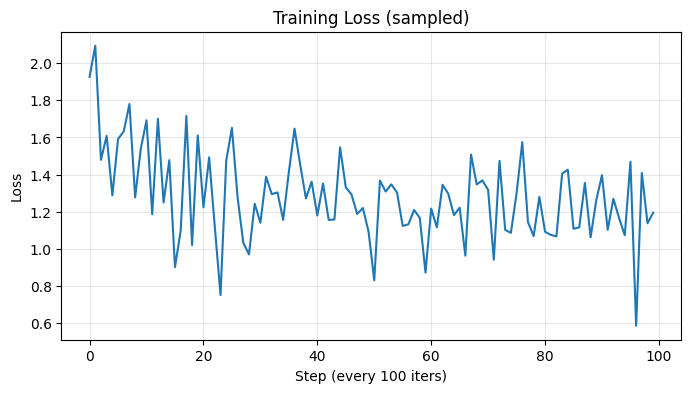
def time_since(since: float) ->str: s = time.time() - since m = math.floor(s /60) s -= m *60returnf"{m}m {s:.0f}s"all_losses = []running_loss =0.0start = time.time()model.train()for it inrange(1, n_iters +1): input_tensor, target_tensor = get_training_batch(chunk_len) # get a random training example loss = train_step( model=model, optimizer=optimizer, criterion=criterion, input_tensor=input_tensor, target_tensor=target_tensor, ) running_loss += lossif it % print_every ==0: avg = running_loss / print_everyprint(f"[{time_since(start)}] iter {it}/{n_iters} | loss {avg:.4f}") running_loss =0.0if it % plot_every ==0:# (Note: this uses the current 'running_loss' window; simple + good enough for demo) all_losses.append(loss)print("Training finished.")
[1m 29s] iter 500/10000 | loss 1.9262
[2m 41s] iter 1000/10000 | loss 1.5714
[3m 43s] iter 1500/10000 | loss 1.4704
[4m 47s] iter 2000/10000 | loss 1.3964
[5m 50s] iter 2500/10000 | loss 1.3304
[6m 50s] iter 3000/10000 | loss 1.3200
[7m 48s] iter 3500/10000 | loss 1.2912
[8m 49s] iter 4000/10000 | loss 1.2752
[9m 50s] iter 4500/10000 | loss 1.2663
[10m 47s] iter 5000/10000 | loss 1.2511
[11m 53s] iter 5500/10000 | loss 1.2561
[12m 53s] iter 6000/10000 | loss 1.2489
[14m 2s] iter 6500/10000 | loss 1.2206
[15m 13s] iter 7000/10000 | loss 1.2200
[16m 14s] iter 7500/10000 | loss 1.2333
[17m 15s] iter 8000/10000 | loss 1.2115
[18m 13s] iter 8500/10000 | loss 1.2353
[19m 13s] iter 9000/10000 | loss 1.2139
[20m 13s] iter 9500/10000 | loss 1.2244
[21m 13s] iter 10000/10000 | loss 1.2092
Training finished.
4.3 Loss Visualization
Show Code
plt.figure(figsize=(8, 4))plt.plot(all_losses)plt.title("Training Loss (sampled)")plt.xlabel(f"Step (every {plot_every} iters)")plt.ylabel("Loss")plt.grid(True, alpha=0.3)plt.show()
5. Model Inference & Export
Show Code
def generate(model, start_str='Once upon a time', predict_len=100, temperature=0.8): model.eval() # Set to evaluation mode hidden = model.init_hidden()# Convert start string to tensor# We loop through the start string to "warm up" the hidden statefor i inrange(len(start_str) -1): inp = line_to_tensor(start_str[i]) _, hidden = model(inp, hidden)# The last character of start_str is our first actual input for generation inp = line_to_tensor(start_str[-1]) predicted = start_strfor p inrange(predict_len): output, hidden = model(inp, hidden)# Sample from the network output# divide by temperature to control randomness (lower = more predictable) output_dist = output.data.view(-1).div(temperature).exp()# Select one index based on the probability distribution top_i = torch.multinomial(output_dist, 1)[0]# Convert index back to character char = index_to_char(top_i.item()) predicted += char# Use the predicted character as the next input inp = line_to_tensor(char)return predicted# Run the generationprint("--- Generated Text (Temp=0.8) ---")print(generate(model, start_str="The", predict_len=400, temperature=0.8))print("\n--- Generated Text (Temp=0.5 - More Conservative) ---")print(generate(model, start_str="The", predict_len=400, temperature=0.5))
--- Generated Text (Temp=0.8) ---
The merchants-dance sure the sprime an flapping bead of began to reckates one can way brange when the Second cleeps son, for he would have gone heart range to
the Linnet; I have least had besides; of the Princess of swould not understaing his
will heart of friend at resure, and was she sang
exchank to where I will be a great shall
that the Student in the garden rather of commons, but I lovely sho

--- Generated Text (Temp=0.5 - More Conservative) ---
The sat the lips arms of the most of the lips a great shall in the spring to me any on the Rocket of the most scried the Prince of her friendship, and the red rose so she was fur chain, and when the Rocket; but not say of a large broar of the morations could be a basket of the Rocket of the workment than the sailed out of the world the window as he went the statue of a
red rose, for a great of himse
Comments